Dialogue Tutorial
Part 1: Introduction
Srikandi, partial edition 7/29/2003*
[*Minor errors corrected from 7/28 version -- thanks, Argent and Klinn!]
This is a tutorial for developing dialogue in the TES Construction Set. There are some existing tuts out there already, but none of them is purely on dialogue; they combine dialogue with NPC creation and scripting information. They also only cover a small portion of what's possible with the dialogue interface in the CS. The goal of this tutorial is to be comprehensive: it will cover pretty much everything you can do with dialogue. It takes a step-by-step approach, introducing new concepts one at a time, with several different examples of each before moving on.
This version is incomplete; it covers greetings and topics, including conditions, random responses, results, and choices. Future sections will cover quests and the journal, factions, persuasion, voice, and possibly more.
I assume you already know the basics of the editor, including how to place objects in the world and set their properties; if you don't, you should try a basic CS tutorial or two first. This is NOT a scripting tutorial and does not assume any knowledge of scripting; but script functions and concepts that are directly relevant to dialogue will be introduced.
The tutorial is designed to be used with a small sample .esp file, "DialogTut.esp", included in the zip. This mod includes a new village called "Neverland", with a number of NPCs, places, and objects, in its own interior cell; this is so you can experiment freely without affecting anything in the standard game. Neverland is unconnected to Morrowind proper; you'll travel there for testing purposes by typing "coc Neverland" in the console. This mod is just an .esp; to install it, just put it in Morrowind/Data Files. (Doesn't require Tribunal or Bloodmoon.)
Throughout the tutorial, step-by-step instructions are in light text on a dark background; general reference information is in dark text on a light background, and framed by a border. That's so you can easily refer back to the reference material when you need to.
Questions, corrections, and suggestions are welcome.
Overview of dialogue
A couple of things to know about dialogue in Morrowind:
-
By default, all dialogue is for every NPC. That is, until you take steps to restrict it, any greeting or topic you add could be said by anybody in the game.
-
This is because all dialogue and journal entries for the whole game are stored in one big database. If you aren't careful, therefore, you can easily take an action in the dialogue window that affects a distant part of the game. Once you understand what you're doing it's easy to avoid this, however.
-
Since dialogue entries interact with each other in complex ways, it's wise when adding dialogue to proceed gradually, and test at each step to make sure things are happening the way you expected. I'll be encouraging you to test frequently as we proceed through the tutorial.
Because the "all dialogue is for everyone" idea is at the heart of the Morrowind dialogue system, we'll be taking the opposite approach from most tutorials. We'll start with some very general greetings to be said by many people, and then learn different ways to restrict them to certain groups, and finally get to dialogue tailored to a single NPC.
OK, now let's get oriented to the dialogue interface.
-
-
Load Morrowind.esm and DialogTut.esp
-
Open the dialogue window by clicking the speech balloon button on the toolbar
-
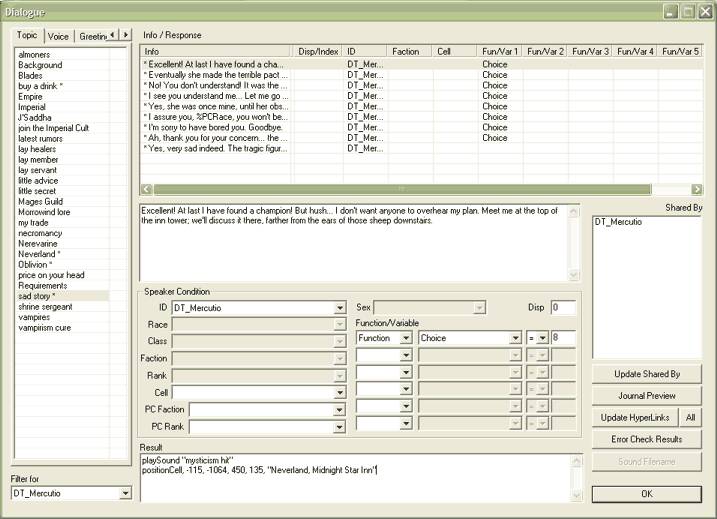
Take a look at the window, and compare it to the following diagram:
|
Structure of the Dialogue Window
|
|
Topic List:
[tabs]
Topic
Voice
Greeting
Persuasion
Journal
|
Info / Response Table
[contents depends on Topic List tab selected]
|
|
Info / Response Text Box
[for viewing and editing the full text of an info/response entry]
|
Troubleshooting
& Sound:
Update Shared By
Journal Preview
Update Hyperlinks
Error Check Results
Sound Filename
|
|
Speaker Condition
[for restricting when an info/response entry is said]
|
ID
Race
Class
Faction
Rank
Cell
PC Faction
PC Rank
|
Sex
|
Disposition
|
|
Function/Variable
[6 slots for complex conditions]
| |
|
"Filter for" box
[for viewing topics for a particular NPC only]
|
Result Box
[for script commands that are executed when a dialogue entry is said]
|
Enough background -- let's start writing!
>> On to Greetings >>