TES CS Greetings and Basic Conditions
Dialogue Tutorial
Part 2: Greetings & Basic Conditions
<< Back to Introduction<<
Adding a Greeting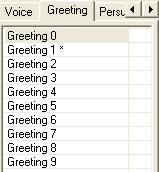
Let's start by making a greeting for everyone in Neverland.
-
Open Morrowind.esm and DialogTut.esp in the TESCS.
-
Open the dialogue editor (speech balloon button).
-
Make sure the Topics list is unfiltered: the Filter For box should be blank. (If it isn't, click the down arrow by "Filter For" and scroll to the blank entry at the top of the list.) In general, we'll want to keep this blank unless otherwise indicated.
-
|
Greetings sections
Greetings are divided into nine sections. From the computer's point of view, though, it's really just one long list; the sections are just for convenience. Each Greetings area has its own conventional use, as follows:
Greetings 0: NPC is alarmed
Greetings 1: Quests where it doesn't matter if the Player is a vampire, is nude, is a criminal, is diseased
Greetings 2: Player is a vampire/player is nude
Greetings 3: Traitors to the Morag Tong
Greetings 4: Crime and disease
Greetings 5: Other quests
Greetings 6: Factions
Greetings 7: Classes, Endgame, Slaves
Greetings 8: Clothes (general greetings concerning how player is dressed)
Greetings 9: Locations
Does it matter where you put a new greeting?
Yes, it does. When you activate an NPC, the computer starts at the top of the list in Greeting 0, and keeps going through the list towards the end of Greeting 9, looking for a greeting whose conditions are met.
That means, for instance, that if you put a greeting in Greetings 1, it will be said even if the player is nude; if you put it in Greetings 3, it won't be said if the player is nude, since the conditions for one of the greetings in 2 will have been met.
Since the greeting for the Nerevarine is in Greetings 7 ("Endgame"), greetings in 8 and 9 will never be said to a player who is the Nerevarine.
|
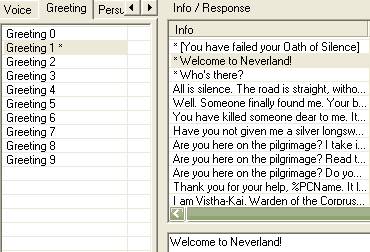
With that in mind, let's put our greeting in Greetings 1, so that you'll be able to see it no matter what your character has done. We'll need to put it (and all the other greetings we add in this tutorial) after the first greeting on that list, since that one is crucial for the Sanctus quest. So:
-
Click on Greetings 1 on the Greeting tab.
-
Right-click on the second greeting in the Info/Response list, and choose "New". ("New" inserts a line before the line selected.)
-
You could start typing now, but you won't be able to see much of what you type. So click in the text box below the Info/Response list.
-
Type (or copy and paste) this:
Welcome to Neverland!
When you move your cursor off the field, this text will show up in the Info/Response table.
Notice that the entries above and below this entry have acquired asterisks, meaning that they've been modified. Why?
|
Dialogue is stored as a "Linked List"
This means that each entry contains a pointer to the next entry and the previous entry. So if you insert an entry, you modify the previous and following entries as well by changing their pointers. This is normal and doesn't indicate a "dirty mod".
|
So far, so good. Everyone in Neverland will say your new greeting. The only problem is that everyone else in Morrowind will say it too. Why is this?
Dialogue is universal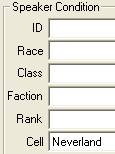
By default, every NPC in the game can say every response. This is true until you take the step of adding conditions to specify who should say what, and under what circumstances. You will always want to add at least one condition to your dialogue.
|
Clearly we need to make sure that only Neverlanders say "Welcome to Neverland".
-
In the Speaker Condition area, click the down arrow by the Cell drop-down.
-
Start typing "Neverland", and hit Return when Neverland is selected. (The dialogue window has some very long drop-down lists, so it's good to get into the habit of using this method to select an item.)
|
Saving dialogue changes
Changes to the dialogue database are recorded as soon as you leave a field you've altered. You don't have to click the OK button to save your changes, as you do with other objects. Therefore, since the dialogue window takes a little while to load, you can just leave it open when you test your mod. You do of course have to save the mod itself before testing.
|
-
Verify that your dialogue is correctly filtered.
|
Update Shared By
At any time, you can see who can say a particular info/response item. Click the "Update Shared By" button on the right of the dialgoue window, and you'll see a list of NPCs who are included by the current set of conditions. This is a good way to check whether your conditions work the way you intended.
|
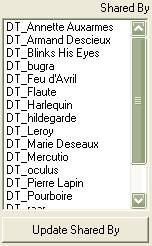
Under "Shared By", you should see a list that contains all the NPCs in Neverland, and no other NPCs. Neverland NPCs all have IDs starting with DT_, so this should be easy to verify.
All right, now it's time for a test. You should always test from a "clean save", that is, using a character who has never played using your mod; that prevents possible conflicts between mod data and data in your save game. Safest is to test with a brand-new character, and don't save while testing -- each test should be done with a character who is seeing Neverland through fresh eyes.
-
-
Start the Morrowind launcher, and make sure that DialogTut is selected under Data Files.
-
Start Morrowind, and start a new character or load a saved one -- from before the mod was loaded.
-
First, talk to someone in Vvardenfell to ensure that they don't have the Neverland greeting.
-
Then go to Neverland by typing "coc Neverland" in the console.
-
Walk around and talk to people. (There are people outdoors and in the Midnight Star inn.) They should say "Welcome to Neverland!".
We'll be using the "Neverland" filter on all the dialogue we do in this tutorial (except dialogue for unique NPCs), since we don't want to affect the rest of the game.
While testing, you may have noticed that actually there are NPCs in several cells that have the new dialogue: "Neverland", and all the interior cells within Neverland, such as "Neverland, Midnight Star Inn". That's because the Cell filter allows partial matches.
|
Cell name matching
When you specify a cell name in a dialogue condition, you actually match the cell itself and any other cells whose IDs start with that name. In other words, Neverland matches both "Neverland" and "Neverland" and "Neverland, Midnight Star Inn"; but "Neverland, Midnight Star Inn" wouldn't match any other cell. This is something to keep in mind when naming cells in your mod; in particular, in the case of interiors, it's a good idea to use the name of the exterior cell at the beginning of the cell name.
|
Personalizing Dialogue: Text Defines
It's boring when everyone says the same thing. Let's personalize this greeting a bit. There are two ways to do this: we can add more conditions, or we can use "Text Defines". Let's start with Text Defines, which don't require adding extra info/response entries.
|
Text Defines
Text Defines are strings that can be inserted into dialogue by using a special code. Those codes are given below.
The same codes can be used in messageboxes; in that case the "%" is replaced by a "^".
|
Speaker-related defines
|
|
%Name
|
The speaker's name
|
|
%Race
|
The speaker's race
|
|
%Class
|
The speaker's class
|
|
%Faction
|
The speaker's faction. If they have no faction, it will be blank.
|
|
%Rank
|
The speaker's rank
|
|
Player-related defines
|
|
%PCName
|
The player's name
|
|
%PCRace
|
The player's race
|
|
%PCClass
|
The player's class
|
|
%PCRank
|
The player's rank in the speaker's faction
|
|
%NextPCRank
|
The player's next rank in the speaker's faction
|
|
%Cell
|
The cell the player is currently in
|
|
Globals
|
|
%[varname]
|
Global variables. You can set your own with scripting, but that's beyond the scope of this tutorial. However, there are some predefined ones you can use. Their usefulness in dialogue is somewhat limited by the fact that variables can only hold numbers, not strings, so these will only show numeric values.
|
|
%GameHour
|
Hour of the day, using 24-hour decimal notation. So 6:30 PM would show up as 18.5.
|
|
%Day
|
Day of the month.
|
|
%Month
|
Month of the year, in number form.
|
|
%Year
|
Tamrielic year. (MW starts on Day 16, Month 7, Year 427.)
| |
Test your dialogue again. Save, go to Neverland, walk around town and talk to everybody, and find out who they are.
Ordering conditions
There's something a little funny about this dialogue. For one thing, "commoner" isn't really a profession. So let's have the commoners say something different. Note: I'm going to give you some flawed instructions, and then show you how to fix it.
Sounds good -- Neverland commoners say one thing, other Neverlanders say something else. Try testing this in the game.
See the problem? The commoners never say what you want them to say. Instead, they have the standard Neverland greeting. Why is this?
It's because the game starts at the top of the list and stops at the first applicable greeting. In this case, that's the greeting that applies to all Neverlanders. To get the commoners to say something different, we'll have to move their greeting ABOVE the other one. That way, they'll say their greeting, and everybody else in the cell will say the "default". The more specific set of conditions should always go above the more general set of conditions.
To fix the error:
-
Select the greeting that specifies "commoner".
-
Use the left arrow key to move it up in the list (the right arrow key moves an item down).
Save and test. The commoners should now give their special greeting.
Disposition
So far everyone is a little too friendly. That's fine if they like you, but if they don't, that should be reflected in their greeting. Let's add a "disposition" condition. This is the box marked "Disp" in the top right corner. Any dialogue with a disposition value will only be said by people whose disposition is higher than this number, so the greeting for people who don't like you should go under all the others.
-
Insert a new greeting underneath all the other ones you've put in so far.
-
Filter it for "Neverland".
-
I don't know who you are or how you got here, but I hope you're not staying.
-
Now scroll through each of the other greetings you've added so far, and type "40" in the "Disp" box.
This will ensure that your new greeting is said only by people whose disposition is less than 40... since they're the only ones who haven't already said something else.
Competing conditions
Let's do one more, just to really drive the point home -- since ordering is the cause of more dialogue trouble than anything else. Let's change the greeting that Bretons give.
Like the Commoner greeting, this one clearly has to go above the general Neverland greeting. But does it go before or after the Commoner greeting?
Well, that depends. There are some Breton commoners in the village. If you want them to give the Breton greeting, that should go first. If you want them to give the Commoner greeting, THAT should go first.
Or, you could add a greeting specifically for Breton commoners, and filter it for both categories -- something like "Even though I'm a Breton, I'm getting tired of this place". In that case, your Breton Commoner greeting would have to go above all the others.
I'll leave it up to you which you prefer. Use the arrow keys to move it where you want it, save, and test.
>> On to Function/Variable Conditions >>

